Your day, in hand.
It draws all 24 hours on one canvas (last night's sleep, every meeting, the energy between them) and prices whatever lands on it.
Today, read by 07:30. Every invite priced before you say yes.
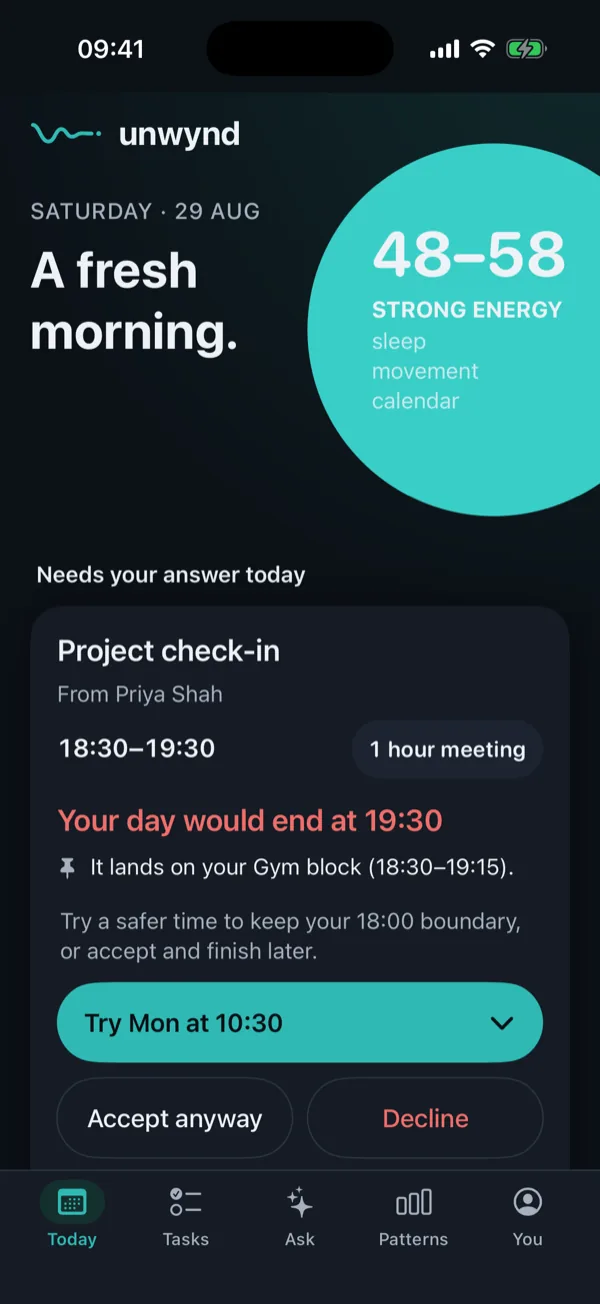
Your calendar shows what's booked. Never what it costs.
every hour looks the same on a grid · none of them feel the same
What it reads
It reads your whole day.
Your calendar and tasks, your sleep and heart from Apple Health, training from Hevy, real obligations from Gmail: read-only, in the background. It draws them as one day, and marks where your energy actually sits.
Then an invite arrives
It prices the ask.
A 16:30 invite, costed against the day you actually have, before you answer.
Sat 14:21 · invite: sprint review, 16:30–17:15
21:40 if you say yes.Where your day would end. Accept, decline, or offer 11:30 tomorrow. One tap, and it leaves a receipt you can undo.
A week, priced
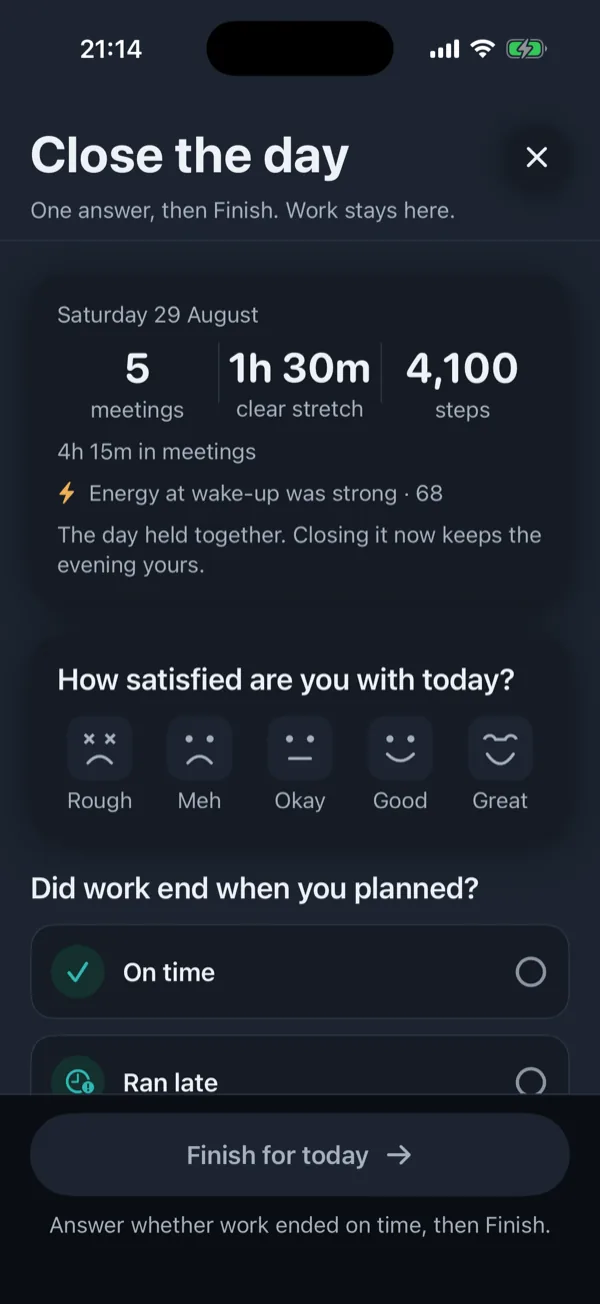
Priced days end differently.
Sources & privacy
Your record stays yours.
Connections read; only you confirm a write. And your health numbers never reach a language model: answers are computed from your record, your numbers added after. That's enforced in code, not in a policy.
Questions
The honest answers, up front.
What does Room connect to?
On your iPhone: Apple Health, Apple Calendar and Apple Reminders, plus anything that shares with Apple Health, such as Apple Watch, Oura, WHOOP or Garmin Connect. Through your accounts: Google Calendar, Gmail, Google Tasks, Todoist, GitHub, Hevy and Last.fm. Microsoft 365 and Outlook are coming. You pick each one. Connections read; the only writes are the ones you confirm, and each leaves a receipt.
Do I need a wearable?
No. Apple Health is optional. Without it, Room plans from your calendar and your usual bed and wake times, and marks the read as provisional. If a watch or a ring shares your sleep with Apple Health, Room uses that instead.
What can I ask it?
Anything your own record can answer. “When did I last train legs?” comes back with a day and a clock, from Hevy. “What's my afternoon look like?” is read off the real calendar. “Log lunch” opens a preview you confirm, then it lands on the day as a receipt. And when the record can't answer, Room says so and names the missing source, instead of guessing.
Does Room change my calendar?
Only when you confirm it. Before an RSVP, a hold or a moved meeting reaches your calendar, Room shows you what will change and waits for your yes. Replies it drafts are yours to copy and send; Room doesn't send them.
Is the energy number a health score?
No. It's a planning estimate drawn from your sleep, movement and calendar, shown as a word such as strong or steady, with the inputs it was drawn from. It is not a medical measurement, and when the data is thin Room marks the read as provisional. Your watch will happily hand you an 87 out of nowhere; Room would rather tell you what it doesn't know.
Is my data actually safe?
Your health numbers never reach a language model: answers are computed from your record and your numbers are added after, and that guard is enforced in code. The database keeps your data to your own account, and the keys to your connections and the files you upload are encrypted. Nothing is sold, used for ads or used to train models, and you can export or delete all of it from the app.
How often will it bother me?
Only when there's something worth knowing. The morning read arrives at a time you choose. Once a source is connected, a morning brief and an evening wrap come only on days with something to say, and alerts (a failed payment, a reply needed today, an invitation that runs past your finish) come as they are found, at most four a day. The evening edition and the heads-ups before a peak, a dip or wind-down stay off until you switch them on. Every kind of nudge has its own switch.
What will it cost?
Every account starts with seven days of the whole product from your first sign-in, and you don't need a card to start. After that it's £8.99 a month or £89.99 a year (£7.50 a month). Students with a .ac.uk or .edu email address pay £4.99 a month. There's no free plan. If you stop paying, your record stays yours to export or delete.
How do I cancel?
In your App Store settings on your iPhone, at any time. Pro stays on until the end of the period you've paid for.
How do I get it?
Room is an iPhone app on the App Store. Until the listing is live, the store buttons on this page say coming soon. Your seven days start at your first sign-in.
On iPhone
Meet the day you actually have.
Seven days of the whole product, then £8.99 a month or £89.99 a year, and £4.99 a month for students.
Coming soon to the App Store